Where to look for 3D eyelashes
An independent walkthrough dated October 4 describes Style Studio, with Hair, Lashes and Face Extras categories and a search field. Its fit controls include size, horizontal position, height and depth. This is an older-build reference: the official title now says LASH TECH UPDATE, so follow the labels visible in your current session.
Try a broad phrase such as lashes before a narrower style. If the panel separates categories, search inside the appropriate one. Use the search-word helper for short theme-based phrases. It suggests searches; it does not guarantee that a particular catalog item is available.
Fit the lash band before adding more detail
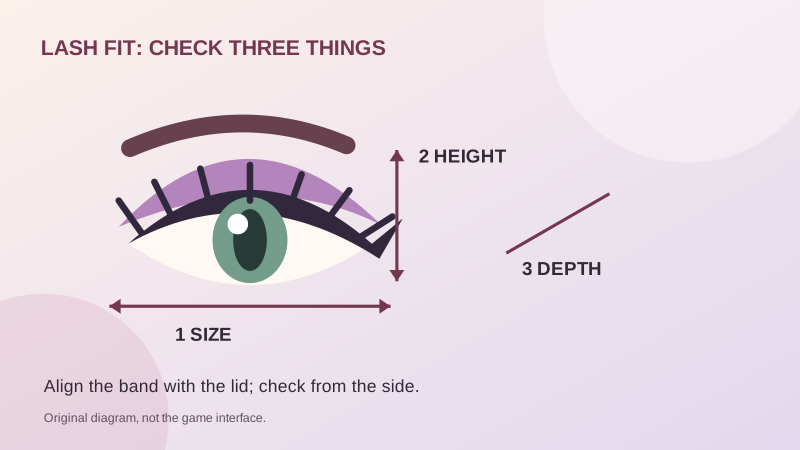
- Establish the eye line. Pick an eye shape and keep the lid visible while trying the accessory.
- Size first. Aim for a band that spans the lid rather than a tiny object near the center of the face.
- Center and raise or lower. Align the band with the lid instead of compensating for a vertical error with extra size.
- Check depth. From a side view, distinguish an item buried in the face from one floating in front of it.
- Change one setting at a time. If the result gets worse, restore the previous setting or use a reset control if available.
- Check again with hair. View the complete head from the front and side before committing to more detail.
These are fitting checks, not a claim that the current build has exactly six adjustment controls. The latest control count and limits have not been independently verified.
Why might lashes disappear when you add brows?
The October 4 independent guide reports that brow and lash accessories replaced each other in a shared slot. We have not confirmed whether that remains true after the lash update. If it happens in your session, remove the new brow accessory and retry the lashes alone.
Distinguish an accessory from makeup drawn on the face. Painted brows are worth trying when you want to retain a lash accessory, but do not assume every layer combination is supported. Test the combination early in the round, before spending the remaining time perfecting it.
Layering hair and avoiding accidental purchases
Roblox's pass description confirms that Second Hair Slot enables a second hairstyle. Its checked base price is 99 Robux, and VIP at 399 Robux also lists a second-hair benefit. Read the full pass comparison before buying overlapping features.
For two-piece styling, try a main silhouette first and add a smaller fringe or face-framing piece second. Check the forehead, parting and ears for overlap. Similar color names do not guarantee a match between catalog items.
A try-on is not proof that you own an item. Read the item row and Roblox purchase dialog; a pass's feature unlock should not be assumed to include every paid accessory. If you only want a practice look, keep the workflow in preview and avoid confirming a purchase.
Sources and review scope
- Makeup Mania on Roblox — Official Place 117935850321807; identity and description checked October 10, 2026.
- MakeupMania.wiki: hair and lashes walkthrough — Independent guide marked October 4, 2026. Older-build interface and slot behavior; not confirmed after LASH TECH UPDATE.
- Official Roblox game-pass list — Four on-sale passes, descriptions and base prices checked October 10, 2026. Your checkout may differ.
Checked 2026-10-10. Public-source review; this guide does not claim a hands-on test of the current Roblox build. Original palettes, diagrams and search suggestions are GameTinkerer editorial work.